Hello Learners... Here I am with another post on an amazing topic Kubernetes. So, let's get started...
What is Kubernetes?
Kubernetes is a portable, extensible, open-source platform for managing containerized workloads and services, that facilitates both declarative configuration and automation. It has a large, rapidly growing ecosystem. Kubernetes services, support, and tools are widely available.
The name Kubernetes originates from Greek, meaning helmsman or pilot. Google open-sourced the Kubernetes project in 2014. Kubernetes combines over 15 years of Google's experience running production workloads at scale with best-of-breed ideas and practices from the community.
Why Use Kubernetes?
Companies out there maybe using Docker or Rocket or maybe simply Linux containers for containerizing their applications. But, whatever it is, they use it on a massive scale. They don’t stop at using 1 or 2 containers in Prod. But rather, 10’s or 100’s of containers for load balancing the traffic and ensuring high availability.
Keep in mind that, as the traffic increases, they even have to scale up the number of containers to service the ‘n’ no of requests that come in every second. And, they have to also scale down the containers when the demand is less. Can all this be done natively?
Well to be honest, i’m not sure it can be done. Even if it can be done, it is only then its only after loads of manual effort for managing those containers. So, the real question is, is it really worth it? Won’t automated intervention make life easier? Absolutely it will!
That is why, the need for container management tools is imminent. Both Docker Swarm and Kubernetes are popular tools for Container management and orchestration. But, Kubernetes is the undisputed market leader. Partly because it is Google’s brainchild and partly because of its better functionality.
Logically speaking, Docker Swarm is a better option because it runs right on top of Docker right? If I were you, I would have had the same doubt and it would have been my #1 mystery to solve.
If I could choose my pick between the two, then it would have to be Kubernetes. The reason simply being: Auto-scaling of containers based on traffic needs. However, Docker Swarm is not intelligent enough to do Auto-scaling.
Features of Kubernetes
1. Automatic Binpacking
Kubernetes automatically packages your application and schedules the containers based on their requirements and available resources while not sacrificing availability. To ensure complete utilization and save unused resources, Kubernetes balances between critical and best-effort workloads.
2. Service Discovery & Load balancing With Kubernetes, there is no need to worry about networking and communication because Kubernetes will automatically assign IP addresses to containers and a single DNS name for a set of containers, that can load-balance traffic inside the cluster.
3. Storage Orchestration With Kubernetes, you can mount the storage system of your choice. You can either opt for local storage, or choose a public cloud provider such as GCP or AWS, or perhaps use a shared network storage system such as NFS, iSCSI, etc.
4. Self-Healing Personally, this is my favorite feature. Kubernetes can automatically restart containers that fail during execution and kills those containers that don’t respond to user-defined health checks. But if nodes itself die, then it replaces and reschedules those failed containers on other available nodes.
5. Secret & Configuration Management Kubernetes can help you deploy and update secrets and application configuration without rebuilding your image and without exposing secrets in your stack configuration.
6. Batch Execution In addition to managing services, Kubernetes can also manage your batch and CI workloads, thus replacing containers that fail, if desired.
7. Horizontal Scaling Kubernetes needs only 1 command to scale up the containers, or to scale them down when using the CLI. Else, scaling can also be done via the Dashboard (kubernetes UI).
8. Automatic Rollbacks & Rollouts Kubernetes progressively rolls out changes and updates to your application or its configuration, by ensuring that not all instances are worked at the same instance. Even if something goes wrong, Kubernetes will rollback the change for you. These were some of the notable features of Kubernetes. Let me delve into the attractive aspects of Kubernetes with a real-life implementation of it and how it solved a major industry worry.
Kubernetes Architecture
So, now on moving onto the next part of this ‘what is Kubernetes’ blog, let me explain the working architecture of Kubernetes.
Since Kubernetes implements a cluster computing background, everything works from inside a Kubernetes Cluster. This cluster is hosted by one node acting as the ‘master’ of the cluster, and other nodes as ‘nodes’ which do the actual ‘containerization‘. Below is a diagram showing the same.
Kubernetes Master Node
Master Node is a collection of components like Storage, Controller, Scheduler, API-server that makes up the control plan of the Kubernetes. When you interact with Kubernetes by using CLI you are communicating with the Kubernetes cluster’s master node. All the processes run on a single node in the cluster, and this node is also referred to as the master.
Master Node Components:
1) Kube API-server performs all the administrative tasks on the master node. A user sends the rest commands as YAML/JSON format to the API server, then it processes and executes them. The Kube API-server is the front end of the Kubernetes control plane.
2) etcd is a distributed key-value store that is used to store the cluster state. Kubernetes stores the file in a database called the etcd. Besides storing the cluster state, etcd is also used to store the configuration details such as the subnets and the config maps.
3) Kube-scheduler is used to schedule the work to different worker nodes. It also manages the new requests coming from the API Server and assigns them to healthy nodes.
4) Kube Controller Manager task is to obtain the desired state from the API Server. If the desired state does not meet the current state of the object, then the corrective steps are taken by the control loop to bring the current state the same as the desired state.
There are different types of control manager in Kubernetes architecture:
- Node Manager, it manages the nodes. It creates new nodes if any node is unavailable or destroyed.
- Replication Controller, it manages if the desired number of containers is running in the replication group.
- Endpoints controller, it populates the endpoints object that is, joins Services & Pods.
Kubernetes Worker Node
The worker nodes in a cluster are the machines or physical servers that run your applications. The Kubernetes master controls each node. there are multiple nodes connected to the master node. On the node, there are multiple pods running and there are multiple containers running in pods.
Worker Node Components:
1) Kubelet is an agent that runs on each worker node and communicates with the master node. It also makes sure that the containers which are part of the pods are always healthy. It watches for tasks sent from the API Server, executes the task like deploy or destroy the container, and then reports back to the Master.
2) Kube-proxy is used to communicate between the multiple worker nodes. It maintains network rules on nodes and also make sure there are necessary rules define on the worker node so the container can communicate to each in different nodes.
3) Kubernetes pod is a group of one or more containers that are deployed together on the same host. Pod is deployed with a shared storage/network, and a specification for how to run the containers. Containers can easily communicate with other containers in the same pod as though they were on the same machine.
4) Container Runtime is the software that is responsible for running containers. Kubernetes supports several container runtimes: Docker, containers. The business case for Kubernetes
The information technology platforms upon which our businesses, our systems of commerce, and sizable portions of our society, are built, are showing their age. Replacing them is an issue of benefits outweighing costs. As any telecommunications service provider grappling with the 5G Wireless transition will attest, it's difficult for an organization to justify the cost of replacing its entire infrastructure unless its near-term business model can come close to guaranteeing profitability.
Kubernetes is not only making the argument for business profitability but is racking up some test cases to prove itself. In its favor is a growing amount of evidence that the ever-increasing costs organizations pay today to keep up their existing infrastructures, are becoming less and less justified:
- The cloud is based on the first-generation virtualization, which is being rendered obsolete and perhaps, in due course, irrelevant. An image of the software that would normally have been installed on a server's main hard drive, is rendered in the memory and storage of a remote server so that software can run there like it always has before. Now there's no need for software to be made to run like it always has before. The business case for continuing to produce monolithic applications has evaporated, even in the case of massively multiplayer online games whose underlying, proprietary platforms are the exclusive domains of their manufacturers.
- The Internet is mapped using a domain system that maps addresses to their registered owners rather than the functions and services being used. Service meshes are overlaying those maps with more relevant ones, enabling distributed applications to find each other over vastly dispersed networks. And these service meshes are bound tightly to Kubernetes, providing the second most relevant service of the system after workload orchestration.
- Mobile devices are dependent upon mobile apps that distribute "smart" functionality to the client-side, mainly to minimize the information exchanged between clients and servers. With wireless bandwidth no longer a premium commodity, it may become more practical and cost-effective to shift that functionality back to the server-side, enabling a new class of devices that are significantly "dumber" than their predecessors -- albeit with really great cameras -- yet accomplish the same tasks at conceivably greater speeds.
- Public cloud data centers are massive, "hyperscale" facilities that service tens of thousands of tenants simultaneously, oftentimes from distances several hundreds of miles away. With more highly distributable computing, it may become more practical and more desirable to have greater numbers of much smaller data centers, scattered in closer proximity to their users.
- Artificial intelligence comprises the upper class of software, mainly because of its relatively high cost in memory, storage, and other resources. Using distributed service models, comprising a myriad of containers, each with a much smaller footprint, AI may become far more commonplace, to the extent that software that draws better inferences (e.g., "Look out for that tree 30 yards away!") won't be called "smart" as much as it's called "standard operating equipment."
- Containerization makes business software easier to manage. In the context of server-based computing, a container is a package that enables workloads to be virtualized (portable, self-contained, running in isolation) while still hosted by an operating system (as opposed to a hypervisor). Modern applications are made portable among servers by containerizing them, which is not just about packaging put deployment. In a containerized environment, the code for software is retrieved or "pulled" from repositories (some public, others private), then immediately deployed and run in the production environment. This automated deployment method enables software to be improved not just every eighteen months or so, but potentially every day, not just by its originators but by its users as well. In turn, this dramatically improves data center system integrity as well as security.
What "orchestration" means
Orchestration is the effective management and execution of multiple workloads cohabiting an IT platform. In Kubernetes' case, certain workloads may arrive on the platform having already been subdivided into microservices. They still work together but as independent units. Kubernetes orchestration enables those units to be multiplied and redistributed as necessary and phased out when no longer in use.
Industrial Use Case of Kubernetes
1. Tinder’s Move to Kubernetes
Due to high traffic volume, Tinder’s engineering team faced challenges of scale and stability. What did they do? The answer is, of course, Kubernetes.
Tinder’s engineering team solved interesting challenges to migrate 200 services and run a Kubernetes cluster at scale totaling 1,000 nodes, 15,000 pods, and 48,000 running containers. Was that easy? No way. However, they had to do it for the smooth business operations going further.
One of their engineering leaders said, “As we onboarded more and more services to Kubernetes, we found ourselves running a DNS service that was answering 250,000 requests per second.” Tinder’s entire engineering organization now has knowledge and experience on how to containerize and deploy their applications on Kubernetes.
2. Reddit’s Kubernetes Story
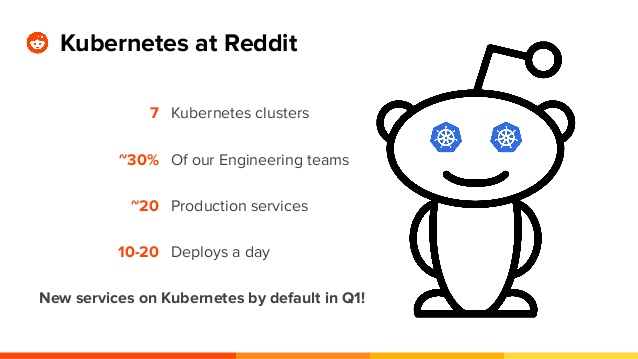
Reddit is one of the busiest sites in the world. Kubernetes forms the core of Reddit’s internal infrastructure.
From many years, the Reddit infrastructure team followed traditional ways of provisioning and configuring. However, this didn’t go far until they saw some huge drawbacks and failures happening while doing the things the old way. They moved to Kubernetes.
3. The New York Times's Journey to Kubernetes
Today the majority of the NYT's customer-facing applications are running on Kubernetes. What an amazing story. The biggest impact has been an increase in the speed of deployment and productivity. Legacy deployments that took up to 45 minutes are now pushed in just a few. It’s also given developers more freedom and fewer bottlenecks.
The New York Times has gone from a ticket-based system for requesting resources and weekly deploy schedules to allowing developers to push updates independently. Check out the evolution and the fascinating story of The New York Times's tech stack.
4. Airbnb’s Kubernetes Story
Airbnb’s transition from a monolithic to a microservices architecture is pretty amazing. They needed to scale continuous delivery horizontally, and the goal was to make continuous delivery available to the company’s 1,000 or so engineers so they could add new services.
Airbnb adopted Kubernetes to support over 1,000 engineers concurrently configuring and deploying over 250 critical services to Kubernetes (at a frequency of about 500 deploys per day on average). I want you to see this excellent presentation from Melanie Cebula, the infrastructure engineer at Airbnb.
5. Pinterest’s Kubernetes Story
With over 250 million monthly active users and serving over 10 billion recommendations every single day, the engineers at Pinterest knew these numbers are going to grow day by day, and they began to realize the pain of scalability and performance issues.
Their initial strategy was to move their workload from EC2 instances to Docker containers; they first moved their services to Docker to free up engineering time spent on Puppet and to have an immutable infrastructure.
The next strategy was to move to Kubernetes. Now they can take ideas from ideation to production in a matter of minutes, whereas earlier they used to take hours or even days. They have cut down so much overhead cost by utilizing Kubernetes and have removed a lot of manual work without making engineers worry about the underlying infrastructure.
6. Pokemon Go’s Kubernetes Story
How was Pokemon Go able to scale so efficiently became so successful? The answer is Kubernetes. Pokemon Go was developed and published by Niantic Inc., and grew to 500+ million downloads and 20+ million daily active users.
Pokemon Go engineers never thought their user base would increase exponentially to surpass expectations within a short time. They were not ready for it, and the servers couldn’t handle this much traffic.
Pokemon Go also faced a severe challenge when it came to vertical and horizontal scaling because of the real-time activity by millions of users worldwide. Niantic was not prepared for this.
The solution was in the magic of containers. The application logic for the game ran on Google Container Engine (GKE) powered by the open source Kubernetes project. Niantic chose GKE for its ability to orchestrate their container cluster at planetary-scale, freeing its team to focus on deploying live changes for their players.
In this way, Niantic used Google Cloud to turn Pokémon GO into a service for millions of players, continuously adapting and improving. This gave them more time to concentrate on building the game’s application logic and new features rather than worrying about the scaling part. Impressive, isn’t it?
Thank you Guys for reading this blog.... Keep Learning.... Keep Sharing....